BigQuery Pricing Models Explained: On-Demand vs Capacity-Based
Kristóf Horváth
10 min read

A team moves to BigQuery reservations expecting to cut costs. Three months later, their bill is higher. It’s a common outcome — not because reservations don’t work, but because the decision to switch was made without running the math first. This post walks you through the available BigQuery pricing models, explains the math that determines when one wins over the other, and gives you a practical framework for making that decision against your own data.
Learn all about BigQuery Editions and Reservations. Download our white paper:
The basics of BigQuery pricing models
BigQuery has two fundamentally different pricing models for compute. Every other concept (editions, reservations, autoscaling, commitments) builds on top of this choice:
-
On-demand pricing charges per byte scanned. Every query is billed based on how much data it reads, at $6.25 per tebibyte (TiB) in US regions (check pricing for your region on cloud.google.com). Google manages execution capacity behind the scenes – roughly 2,000 slots per project, burstable to more, with configuration handled by Google altogether. The tradeoff: you have no control over workload prioritization, no way to isolate critical jobs from noisy neighbors, and costs that scale directly with data volume.
-
Capacity-based pricing flips the model. Instead of paying per byte, you pay per slot-hour consumed. (A slot is BigQuery’s unit of execution capacity; more slots means more parallelism and concurrency.) To enable capacity-based pricing, you create a reservation, choose a BigQuery edition (Standard, Enterprise, or Enterprise Plus — each with different features, pricing, and autoscaling behavior), and assign your projects to it.
By default, this is still pay-as-you-go: you’re charged per slot-hour consumed, not a flat monthly fee. The list price is $0.06 per slot-hour on Enterprise edition in US regions, the most common choice for production workloads. (Check slot-hour pricing for your region on cloud.google.com).
Once you’re on capacity-based pricing, you also have the option to commit to a fixed number of slots for 1 or 3 years in exchange for discounts: 20% for a 1-year commitment, 40% for 3 years. Getting commitments right is its own topic — we’ll cover how to size and configure them correctly in an upcoming post.
| On-demand | Capacity-based (reservations) | |
|---|---|---|
| What you pay for | Bytes scanned | Slot-hours consumed |
| US list price | $6.25 / TiB | $0.06 / slot-hour (Enterprise) |
| Setup required | None | Reservation + edition + project assignment |
| Workload control | None | Isolation, prioritization, autoscaling |
| Best for | Low or irregular query volume | High-volume, recurring workloads |
Neither model is universally better. Which one is cheaper for your workload depends entirely on how that workload behaves, which is why it makes sense to get into the weeds in the next sections.
When to use on-demand pricing for BigQuery?
On-demand is the right default for most teams, and it often stays the right choice longer than people expect.
The model works well when:
- Query volume is low or irregular: you’re not running dozens of heavy queries every day
- Most queries scan relatively small datasets: each query individually costs little
- You don’t have the bandwidth to manage reservations: setup takes time, and ongoing tuning takes more
The core rule: if your queries are cheap individually and don’t run at high frequency, on-demand is almost always cheaper. Capacity-based pricing requires consistent usage to justify its overhead. Switching too early locks you into active management of a system that isn’t saving you money yet.
When to use capacity-based pricing for BigQuery?
The capacity-based BigQuery pricing model starts making sense when your usage patterns shift in a specific direction:
- Recurring, predictable workloads: daily pipelines, scheduled reports, continuous ingestion jobs. These run whether you watch them or not, and on-demand charges you the full byte rate every time.
- Large-scan, low-computation queries: queries that read many terabytes of data but do relatively simple operations like counts, aggregations, or filters on wide tables. These consume a lot of bytes but comparatively few slot-seconds, which makes them expensive on on-demand and cheap on capacity-based pricing.
- Workload isolation requirements: when you need to guarantee that a critical pipeline isn’t affected by an analyst running an unoptimized query, reservations are the only mechanism that delivers this.
The isolation point matters beyond just optimizing costs: reservations give you control over execution priority in a way that on-demand simply doesn’t offer.
How to decide whether it makes sense to switch from on-demand to capacity-based pricing?
Doing the math about whether it makes sense to switch BigQuery pricing models is complicated. This is where most teams skip ahead — and where the expensive mistakes happen.
On-demand bills per byte. Capacity-based bills per slot-second. These are measuring two different things, and a query’s cost under each model depends on a variety of factors.
Learn more:
What Does a BigQuery Job Actually Cost on a Reservation?
Here’s the non-obvious part: the slot-seconds a query consumes are not determined by how much data it reads. They’re determined by computational complexity. A query that does a simple GROUP BY over 10 TiB might consume far fewer slot-seconds than a query doing complex multi-table joins over 500 GB.
Let’s consider the following examples – two queries, very different outcomes:
Consider a daily aggregation pipeline that scans 5 TiB of data and completes in 3 minutes using 1,000 slots:
- On-demand: 5 TiB × $6.25 = $31.25 per run (~$937/month)
- Capacity-based: 1,000 slots × 3 min = 50 slot-hours × $0.06 = $3.00 per run (~$90/month, before reservation overhead)
In this example, capacity-based wins significantly.
Now consider an attribution model that scans only 200 GB but performs heavy multi-table joins and window functions, running for 90 minutes at 500 slots:
- On-demand: 0.2 TiB × $6.25 = $1.25 per run
- Capacity-based: 500 slots × 90 min = 750 slot-hours × $0.06 = $45.00 per run
On-demand wins by a wide margin.
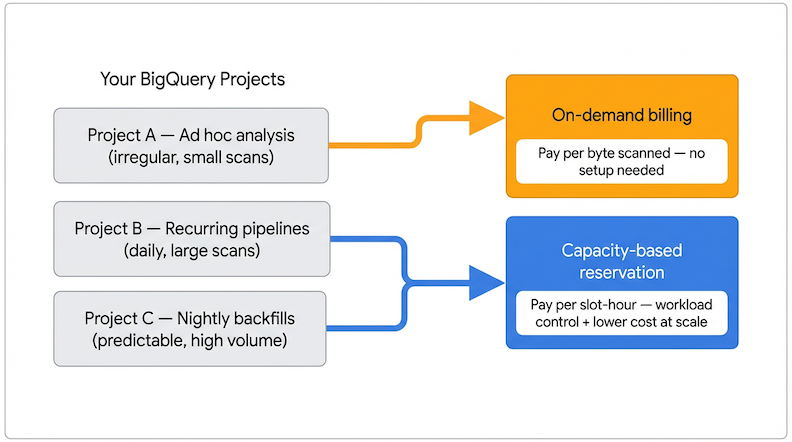
The two examples above illustrate why there’s no universal break-even threshold. The answer depends entirely on data volume and computational complexity for each specific query — both vary widely, even across queries in the same project. Some jobs in a project will be cheaper on capacity-based pricing; others in the same project will be cheaper on on-demand. The only way to know is to run the analysis against your actual usage data.
BigQuery exposes both metrics (bytes processed and slot usage) through INFORMATION_SCHEMA. Our Reservation Planner SQL pulls historical data from your own projects and shows a side-by-side cost comparison per project. The project_to_move_to_reservations.sql query does exactly this, flagging projects where slot-based pricing would have cost less. For a faster starting point, the BigQuery Savings Calculator lets you input usage figures and see estimated savings (along with optimization recommendations) instantly.
One note on the math: the per-run comparisons above don’t account for reservation overhead: idle baseline slots billed around the clock, autoscaler billing windows, and so on. A realistic monthly model needs to factor this in. The Reservation Planner adds a 30% overhead buffer to its estimates for this reason.
This per-query variability is also why project-level decisions only get you so far. Even after you’ve moved a project to reservations, some of its jobs may still be cheaper on on-demand. Dynamic, job-level pricing optimization addresses this by routing each job to the most cost-effective model automatically, without requiring you to split workloads into separate projects.
Learn more:
Unlock 15-20% Savings on BigQuery: The Power of Dynamic, Job-Level Pricing Optimization\
Why is a mixed approach to BigQuery pricing usually the most cost-effective?
The most common mistake teams make when evaluating this decision is treating it as binary.
In real environments, both types of queries almost always coexist, since workloads differ. Forcing everything into one pricing model creates unnecessary cost either way.
- Everything on on-demand: Simple to manage, but expensive once you have recurring, high-volume workloads. You’re paying the full per-byte rate for pipelines that would be a fraction of the cost on capacity-based pricing.
- Everything on reservations: Looks cheaper on paper, but introduces idle capacity waste and management overhead for workloads that were perfectly economical on on-demand.
The right outcome for most teams is a hybrid: reservations for recurring, predictable, high-volume workloads; on-demand for everything else.
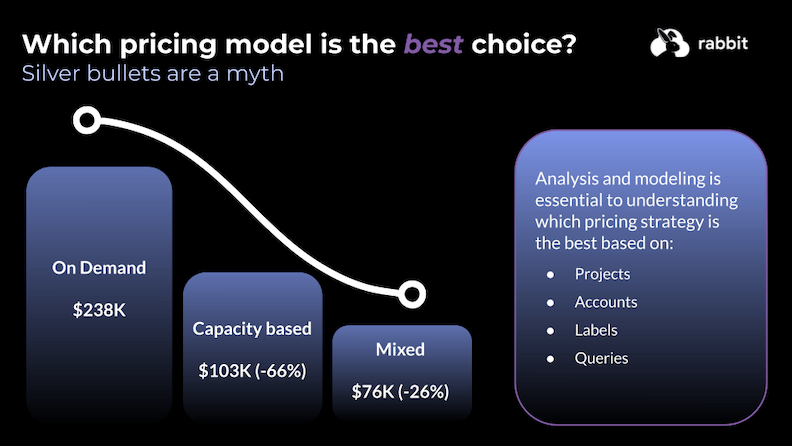
Because reservations apply at the project level in BigQuery, the practical implementation is to separate qualifying workloads into dedicated projects. Many engineering teams restructure their setup so that scheduled pipelines and production analytics run in a reservation-assigned project, while ad hoc analysis and development stay on on-demand. You get the savings where they’re meaningful, without the overhead where they’re not.
How does Rabbit help you keep the right pricing model as usage evolves?
Running the Reservation Planner SQL gives you a snapshot analysis. But query patterns change constantly: new pipelines get added, workloads get restructured, usage grows. A decision that was right six months ago may not reflect your current setup.
Rabbit continuously analyzes INFORMATION_SCHEMA data across your BigQuery projects to track how bytes processed and slot-hours consumed evolve over time. When a project’s usage shifts enough to make a pricing model change worthwhile, Rabbit surfaces it with an estimated savings figure, so you can act on the signal rather than discovering it on a billing statement a quarter later.
The same visibility works in reverse: Rabbit also flags cases where capacity-based pricing is no longer earning its cost for a given workload, helping you avoid the opposite mistake of keeping projects on reservations after their usage patterns have changed.
Getting started with BigQuery Editions and reservations
Once you know which workloads belong on reservations, the next challenge is configuring them without leaving money on the table. The decisions around baseline slots, autoscaling limits, and commitments determine whether your reservation actually saves money or quietly generates waste alongside the queries it runs.
Our white paper covers the complete framework: which projects to move, how to size your reservations, how to configure autoscaling, and how to avoid the most common setup mistakes.
Download the white paper: How To Get Started With BigQuery Editions and Reservations
This is Part 1 of a 4-part series supporting the white paper. Coming next: Part 2 covers BigQuery Editions: Standard, Enterprise, and Enterprise Plus, and what each one actually controls in your reservation setup. Then, Part 3 goes into Baseline Slots and Commitments, the two configuration decisions with the highest financial risk in any reservation setup. And in Part 4: BigQuery Reservations: How Does Autoscaling Really Work?, we go deep into how max slots interact with BigQuery’s Autoscaler.