
BigQuery Reservations: How Does Autoscaling Really Work?
Zoltán Guth (CTO)
11 min read

In this post, we explain how BigQuery autoscaling actually works: how slots are allocated, why the 60-second billing window has a huge impact on your BigQuery costs, how max slots function as hard caps rather than targets, and where most waste originates in real workloads.
Why understanding BigQuery autoscaling is crucial
Most teams treat BigQuery reservation autoscaling as a safety net: set a max slot value, enable it, and assume BigQuery handles the rest. In reality, autoscaling is one of the least understood and most expensive parts of capacity-based pricing.
Autoscaling in BigQuery does not behave like autoscaling in compute systems. It does not continuously adapt to demand, and it is not designed to minimize waste. Instead, it follows a small set of strict rules around slot allocation, billing windows, and scale-down behavior. If you do not understand those rules, autoscaling can quietly dominate your reservation costs.
BigQuery pricing: From on-demand to reservations with autoscaling
To understand how BigQuery reservation autoscaling behaves, it helps to briefly anchor it in the broader pricing model.
Fundamentally, BigQuery offers two ways to pay for query execution:
- On-demand pricing, where you are charged based on the amount of data read by your queries.
- Capacity-based pricing, where you pay for the slots consumed by your queries.
Autoscaling only exists in the capacity-based pricing model.
Slots represent execution capacity units used by BigQuery to run queries and other job types. During execution, BigQuery dynamically determines slot usage based on data volume, query complexity, and available capacity.
BigQuery slot reservations and autoscaling
With capacity-based pricing, you create a reservation of dedicated compute capacity and decide how much capacity BigQuery is allowed to use. Google offers three different BigQuery editions, each with varying features and costs.
The key parameters of reservations are:
- Baseline slots: Minimum slots always allocated. For example, a baseline of 200 slots means you pay for 200 slots every second, even when no queries are running.
- Max slots: Upper capacity limit for autoscaling. Autoscaling can increase slot allocation up to this value, but never beyond it unless idle slot sharing is enabled.
- Autoscaling: The mechanism that adjusts slot allocation between the baseline and the max slots based on observed demand.
On top of this, you can optionally add slot commitments to reduce costs:
- 1-year commitment for a ~20% discount
- 3-year commitment for a ~40% discount
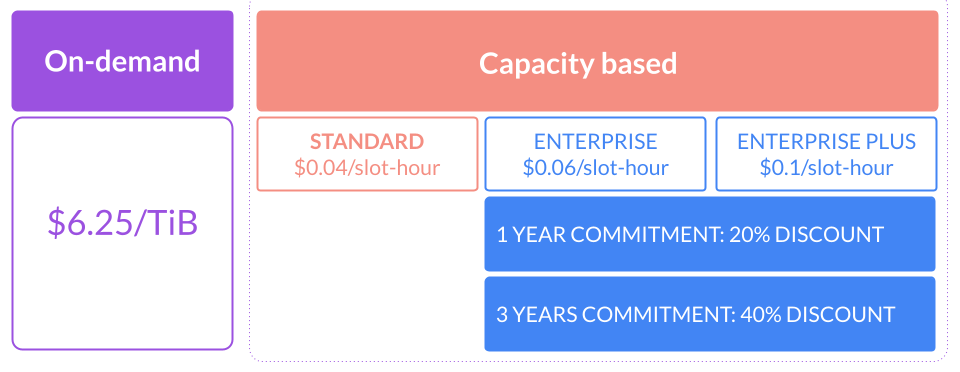
Committed slots behave like discounted baseline: they are always paid for and should reflect steady, predictable usage, not peaks.
Where autoscaling fits in
Autoscaling sits between baseline capacity and peak demand.
- Baseline slots cover minimum, always-on workloads
- Autoscaling handles bursts and concurrency spikes
- Commitments reduce cost for predictable continuous usage
The interaction between these elements is where most confusion and cost inefficiency comes from. Autoscaling doesn’t respond instantly to every query, and doesn’t scale down as aggressively as many engineers expect.
What does the BigQuery autoscaler actually do?
BigQuery’s autoscaler controls how many slots a reservation can use at any moment, within your defined limits.
Max slots is the critical setting: it defines the maximum parallel execution capacity that a reservation can consume. Setting max slots to 3,000 means BigQuery can allocate up to 3,000 slots to queries running in that reservation.
The autoscaler doesn’t decide slot needs—BigQuery’s execution engine does that. The autoscaler only enforces limits and billing behavior.
What are the key rules of BigQuery autoscaler?
BigQuery applies a few rules that define almost all autoscaler behavior:
- Slots scale in increments of 50
- Autoscaled capacity is billed with a 1-minute minimum
- Slot allocation adjusts relatively quickly, usually within ~5 seconds
- Max slots act as a hard cap, not a target
These simple rules have significant cost impact.
Why can max slots waste your BigQuery budget?
The autoscaler is most inefficient when:
- Max slots are set high
- Queries are short-lived
- Workloads are bursty
Example scenario: One query requiring 10,000 slot-seconds.
Scenario A: max slots = 1,000
- BigQuery scales to 1,000 slots
- Query runs for 10 seconds (10,000 ÷ 1,000)
- Query finishes after 10 seconds
- Autoscaled capacity is billed for 60 seconds
Result:
- 10 seconds of useful work
- 50 seconds paid but unused
- ~83% of autoscaled capacity wasted
Scenario B: max slots = 200
- BigQuery scales to 200 slots
- Query runs for 50 seconds (10,000 ÷ 200)
- Query finishes just before the 60-second billing window ends
Result:
- 50 seconds of useful work
- 10 seconds of unused capacity
- ~16% waste
Let’s assume this is the typical usage in every minute for a month so that we can calculate its cost impact (in the US region, where the list price of 1 slout-hour is $0.06).
Scenario A: max slots = 1,000
- 1,000 slot * 24 * 30 * $0.06 = $43.2K
- So in total $36k/month is wasted (~83%)
Scenario B: max slots = 200
- 200 slot * 24 * 30 * $0.06 = $8.6K
- So in total $1.3k/month is wasted (~16%)
Overall, in scenario A, there could be a significant waste of $36K per month, compared to scenario B, where the waste is only $1.3K.
How does BigQuery slot allocation affect cost-performance?
This creates a direct trade-off between cost and performance.
- Higher max slots = reduced query runtime, increased autoscaler waste
- Lower max slots = increased query runtime, reduced autoscaler waste
For most analytical pipelines, this performance trade-off is acceptable. These workloads often run for minutes or hours (BigQuery allows queries to run for up to 6 hours). In that context, adding a few extra seconds or minutes to execution time is often reasonable for a significantly lower cost.
Autoscaling does exactly what it is designed to do. The inefficiency comes from how it interacts with short-running queries and aggressive max slot settings. Understanding this balance is key to configuring autoscaling intentionally rather than reactively.
BigQuery Autoscaling best practices: how to choose a max slot value?
Autoscaling is powerful, but only when it is used for the right type of workload. Most inefficiencies stem from mixing steady usage, bursty usage, and aggressive max slot settings without a clear strategy.
When do baseline slots and commitments make sense?
Use baseline slots and slot commitments only when usage is steady and predictable.
Good use cases:
- Slots are used consistently throughout the month
- Utilization is roughly 70–90% of the time
- Workloads are always running, not just during short windows
Example:
- 500 slots are needed continuously
- Usage is steady for most of the month
- A 3-year commitment provides a 40% discount
In this case, commitments reduce cost without introducing waste.
Baseline slots do not make sense for workloads that:
- Run only a few hours per day
- Are highly bursty
- Sit idle for long periods
In those cases, committed slots quickly become permanent waste.
Where is autoscaling most effective?
Autoscaling excels when usage is uneven across the day.
An example usage pattern can be the following:
- 8,000 slots for 5 minutes
- 300 slots for 10 minutes
- 0 slots for 30 minutes
- 4,000 slots for 15 minutes
This kind of bursty behavior is exactly what autoscaling is designed to handle. The key: avoid pairing it with overly high max slot limits.
Should you use multiple small reservations?
Having many small reservations is rarely efficient.
Common anti-pattern:
- 3–5 separate reservations
- Each with a max slot of 50–500
- Each autoscaling independently
Problems:
- Increases autoscaler overhead
- Reduces autoscale idle slot reuse (because of 60-second minimum billing)
- Makes cost harder to reason about
Recommendation:
- Consolidate into 1–3 medium-larger reservations
- Based on the usage pattern, automatically adjust the max slot throughout the day
This improves utilization, reduces waste, and keeps autoscaling behavior more stable.
How should you set max slots in BigQuery?
Treat max slots as a cost guardrail.
General guidance:
- Lower max = reduced autoscaler waste
- Higher max slots = improved performance but increased cost
Define max slots by workload priority:
-
Critical workloads: Higher max slots, faster execution, higher cost
-
Medium-priority workloads: Moderate max slots, balanced cost and performance
-
Low-priority workloads: Lower max slots, slower execution, cost-efficient
Analytical pipelines usually tolerate slower execution far better than unpredictable cost.
Should you separate reservations by team or use case?
Instead of separating by team or project, consider separating reservations by behavior:
- Latency-sensitive workloads
- Batch pipelines
- Ad hoc analysis
- Background or opportunistic jobs
This lets you tune autoscaling and max slots per reservation without one workload class affecting another.
Choosing the right BigQuery edition for your environment
Edition choice affects what autoscaling features are available.
Practical setup:
- Development and staging → Standard edition
- Production and shared analytics → Enterprise
- Strict compliance or DR requirements → Enterprise Plus
Using Standard for non-production environments saves cost as it is 30% cheaper than Enterprise, but has a limited feature set and SLA, while Enterprise provides the controls needed for production cost and performance management.
Autoscaling works best when it is constrained, intentional, and aligned with workload behavior. Most cost savings come not from complex tuning, but from lowering max slots, consolidating reservations, and matching configuration to how queries actually run.
Should you adjust max slots for predictable peaks?
Static max slot settings are rarely optimal when workloads follow predictable schedules. Many environments have well-known execution windows: nightly pipelines, end-of-day reporting, or periodic backfills.
Practical approach:
- Increase max slots shortly before critical workload windows
- Reduce max slots after those jobs complete
- Keep max slot limits low in lower activity periods
How to improve BigQuery autoscaling efficiency with Rabbit?
BigQuery’s autoscaler is reactive and conservative by design. It is able to scale up super fast if the query is able to use it – however, it doesn’t consider that scaled slots are paid for based on the minimum 60-second period.
Rabbit addresses this gap by continuously changing max slot settings based on a smart algorithm that is trained on historical usage patterns, and it also continuously checks the real-time demand.
Instead of treating max slots as a static configuration, Rabbit adjusts them dynamically based on:
- Actual slot usage patterns
- Query concurrency
- Time-of-day behavior
- Historical usage patterns
The goal is simple: keep enough capacity to meet performance requirements while avoiding oversized max slot values that trigger unnecessary 60-second billing windows.
Reducing autoscaler waste in practice
By adjusting max slots in near real time, Rabbit reduces the amount of paid capacity that sits idle after short-lived spikes. This directly targets the most common autoscaling inefficiency: scaling up aggressively for a few seconds and paying for a full minute.
Across production environments, this approach has reduced reservation autoscaler waste by up to 40%, without slowing down critical workloads.
Our Karrot case study provides a concrete example of this behavior: it shows how dynamic max slot tuning led to measurable cost reductions while preserving query performance.
How to make BigQuery autoscaler waste visible?
Autoscaler waste is hard to reason about without tooling. Rabbit includes a calculator SQL to identify waste/potential savings that shows:
- Available slot-hours vs used slot-hours
- Waste broken down by reservation
- The cost impact of autoscaling behavior over time
This visibility makes it easier to validate whether current max slot settings are reasonable and where further optimization is possible.
By treating autoscaling as something that can be measured, tuned, and automated, Rabbit helps teams move away from static reservation setups and toward configurations that adapt to how BigQuery is actually used.
Autoscaling: costs over convenience
Once you understand how BigQuery reservation autoscaling works, the trade-offs become clear. Autoscaling is governed by fixed rules around slot increments, billing windows, and hard capacity limits. Those rules do not change based on workload intent or business context.
What does change is how much capacity you allow the system to use. Max slots effectively set an upper bound on both performance and spend. Higher values reduce execution time but increase the likelihood of paying for unused capacity. Lower values do the opposite. For most analytical workloads, this is a decision that can and should be made deliberately.
Treating autoscaling as a cost decision rather than a convenience feature makes configurations easier to reason about and budgets easier to control over time.
If you want to see how your current autoscaling settings translate into cost and waste, you can try Rabbit and analyze your reservations using real usage data. Try it now.