
What Does a BigQuery Job Actually Cost on a Reservation?
Csaba Kassai
17 min read

On BigQuery capacity-based pricing, calculating what a job actually costs is not a simple multiplication. This post explains the effective slot-hour cost (the true cost per slot-hour of actual query work) and shows how to use it for accurate BigQuery cost attribution across reservations, teams, and individual jobs.
The difficulties of calculating effective slot hours
Your daily ETL pipeline consumed 120 slot-hours yesterday. What did it cost?
On-demand pricing makes the calculation easy, but on capacity-based pricing (BigQuery reservations), the answer isn’t a simple matter of multiplication. INFORMATION_SCHEMA.JOBS gives you a clean slot_hours number for every job, but there’s no cost column. And you can’t get to cost by multiplying slot-hours by the list price or your commitment rate, because neither reflects what you’re actually paying per slot-hour of work.
The problem is that reservations carry cost beyond what your queries directly consume. You pay for baseline slots whether they’re used or not. You pay for autoscale capacity that gets provisioned but not fully utilized. Commitments change your rate but also create their own dynamics. And if multiple teams share a reservation, all of that overhead gets distributed across every job that ran on it.
The real price per slot-hour of actual query work — what we call the effective slot-hour cost — is almost always higher than the list price or your commitment rate suggests. We’ve seen customers where it was more than double their nominal rate.
What is the effective slot-hour cost in BigQuery?
The effective slot-hour cost answers a straightforward question: for every slot-hour of actual query work on a reservation, how much did I really pay?
effective_slot_hour_cost = attributed_cost / used_slot_hoursWhere:
- attributed_cost is the total cost charged to a reservation in a given period — including its own waste (idle baseline and unused autoscale), but excluding the cost of baseline slots lent to other reservations (those get attributed to the borrower instead)
- used_slot_hours is the slot-hours actually consumed by the reservation’s queries (as reported in
INFORMATION_SCHEMA)
The denominator is what your jobs used. The numerator is what you paid after accounting for cost transfers between reservations. The gap between them — waste, pricing tiers, commitment structures — is what pushes the effective cost above the list price.
But calculating the effective slot-hour cost itself requires understanding five factors. Let’s walk through each.
What’s your actual slot-hour rate?
The first thing to get right is your nominal slot-hour rate. This is not always the list price.
Edition and region matter. BigQuery editions have different list prices, and those prices vary by region. A Standard edition reservation in us-central1 and an Enterprise reservation in europe-west1 have different per-slot-hour rates.
Negotiated pricing matters. Many customers have negotiated rates that differ from list prices. Your actual rate comes from your billing export or the GCP Console billing section, not from the Google pricing page.
Capacity commitments matter. BigQuery lets you purchase capacity commitments — a commitment to a specific number of slots in an administration project for a minimum term. These apply to baseline slots and reduce the per-slot rate:
| Capacity commitment | Rate relative to pay-as-you-go |
|---|---|
| No commitment (pay-as-you-go) | 100% |
| Annual | ~80% of pay-as-you-go (varies by edition and region) |
| Three-year | ~60% of pay-as-you-go (varies by edition and region) |
If you have multiple commitment terms active (say, 500 slots on annual and 200 slots on three-year) the effective committed rate is a weighted average:
committed_slot_hour_rate = (annual_rate × annual_slots + three_year_rate × three_year_slots)
                           / (annual_slots + three_year_slots)
This weighted rate applies to your baseline slot capacity. Idle committed slots that aren’t used by the reservation they belong to can still be borrowed by other reservations in the same admin project, region, and edition — so the commitment isn’t entirely wasted even when baseline utilization is low.
Spend-based CUDs are a separate mechanism. Committed use discounts (CUDs) are purchased at the Cloud Billing account level, not per reservation. Instead of committing to a number of slots, you commit to a dollar amount per hour of BigQuery pay-as-you-go spend. In return, you get a discounted rate — 10% off for a 1-year term, 20% off for 3 years. CUDs apply automatically to all PAYG slot usage (including autoscale) across all projects under the billing account in a given region. This means CUDs can reduce your effective autoscale rate, which capacity commitments alone don’t touch.
How does baseline waste inflate your costs?
Baseline slots are your committed capacity. You pay for them whether your queries use them or not. If your baseline is 1,000 slots but your queries only use 600 during off-peak hours, those 400 idle slots still cost money.
This is wasted baseline cost:
wasted_baseline_cost = wasted_baseline_slots × effective_baseline_slot_rateWhere wasted_baseline_slots are the baseline slots that were neither used by the reservation’s own queries nor lent to other reservations via idle slot sharing.
Learn more:
BigQuery Idle Slot Sharing: How Reservation-Based Fairness Works
Baseline waste typically has two causes:
-
Oversized baseline for off-peak periods. A team sets baseline to 2,000 slots to handle peak demand, but their pipelines only run 8 hours a day. For the other 16 hours, most of that baseline sits idle — that’s paying for 16 hours of unused capacity daily.
-
Gradual demand reduction. Workloads migrate, get optimized, or get decommissioned, but nobody adjusts the baseline downward.
You can measure your baseline idle capacity by joining RESERVATIONS_TIMELINE (which has baseline slot capacity per minute) with JOBS_TIMELINE_BY_ORGANIZATION (which has actual slot usage per second per job):
WITH per_minute AS (
  SELECT
    res.reservation_id,
    res.period_start,
    res.slots_assigned AS baseline_slots,
    COALESCE(SUM(jobs.period_slot_ms), 0) / 1000 / 60 AS avg_used_slots
  FROM `region-YOUR_REGION`.INFORMATION_SCHEMA.RESERVATIONS_TIMELINE res
  LEFT JOIN `region-YOUR_REGION`.INFORMATION_SCHEMA.JOBS_TIMELINE_BY_ORGANIZATION jobs
    ON jobs.reservation_id = res.reservation_id
    AND TIMESTAMP_TRUNC(jobs.period_start, MINUTE) = res.period_start
    AND (jobs.statement_type != 'SCRIPT' OR jobs.statement_type IS NULL)
  WHERE res.period_start >= TIMESTAMP_SUB(CURRENT_TIMESTAMP(), INTERVAL 30 DAY)
  GROUP BY 1, 2, 3
)
SELECT
  reservation_id,
  ROUND(SUM(baseline_slots) / 60, 1) AS total_baseline_slot_hours,
  ROUND(SUM(GREATEST(baseline_slots - avg_used_slots, 0)) / 60, 1) AS idle_baseline_slot_hours,
  ROUND(100 * SAFE_DIVIDE(
    SUM(GREATEST(baseline_slots - avg_used_slots, 0)),
    SUM(baseline_slots)
  ), 1) AS baseline_idle_pct
FROM per_minute
GROUP BY reservation_id
ORDER BY idle_baseline_slot_hours DESC
Note: this shows total idle baseline capacity, which includes both slots that were truly wasted and slots that were lent to other reservations via idle slot sharing. Separating lent from wasted requires correlating with other reservations’ borrowed slot data — the idle slot borrowing section below explains this distinction.
How does BigQuery autoscale waste inflate your reservation costs?
Autoscale slots are the dynamic capacity BigQuery provisions above your baseline when demand spikes. You’d expect to only pay for what you use — and Google does bill you for the actual autoscale slots provisioned. But “provisioned” and “used by your queries” aren’t the same thing.
The BigQuery autoscaler responds to demand by adding capacity, but it doesn’t scale down instantly when demand drops. There’s a ramp-down delay, and the granularity of scaling decisions means you’re frequently paying for more autoscale capacity than your queries need at any given moment. (For a deeper look at how BigQuery’s autoscaler actually behaves, see BigQuery Reservations: How Does Autoscaling Really Work?)
This creates autoscale waste:
autoscale_waste_percentage = 100 × (1 - used_autoscale_slots / autoscale_slots)In practice, autoscale waste typically lands in the 40-60% range. With our customers, we’ve observed cases exceeding 60%, meaning the user was paying for more than twice as many autoscale slot-hours as their queries needed.
The cost impact:
wasted_autoscale_cost = wasted_autoscale_slots × pay_as_you_go_slot_hour_rateYou can measure your autoscale waste per reservation. The RESERVATIONS_TIMELINE view exposes period_autoscale_slot_seconds — the total autoscale slot-seconds billed in each minute. Compare that against actual slot usage above the baseline:
WITH per_minute AS (
  SELECT
    res.reservation_id,
    res.period_start,
    res.slots_assigned AS baseline_slots,
    res.period_autoscale_slot_seconds / 60.0 AS avg_provisioned_autoscale,
    COALESCE(SUM(jobs.period_slot_ms), 0) / 1000 / 60 AS avg_used_slots
  FROM `region-YOUR_REGION`.INFORMATION_SCHEMA.RESERVATIONS_TIMELINE res
  LEFT JOIN `region-YOUR_REGION`.INFORMATION_SCHEMA.JOBS_TIMELINE_BY_ORGANIZATION jobs
    ON jobs.reservation_id = res.reservation_id
    AND TIMESTAMP_TRUNC(jobs.period_start, MINUTE) = res.period_start
    AND (jobs.statement_type != 'SCRIPT' OR jobs.statement_type IS NULL)
  WHERE res.period_start >= TIMESTAMP_SUB(CURRENT_TIMESTAMP(), INTERVAL 30 DAY)
  GROUP BY 1, 2, 3, 4
)
SELECT
  reservation_id,
  ROUND(SUM(avg_provisioned_autoscale) / 60, 1) AS total_autoscale_slot_hours,
  ROUND(SUM(LEAST(GREATEST(avg_used_slots - baseline_slots, 0), avg_provisioned_autoscale)) / 60, 1)
    AS used_autoscale_slot_hours,
  ROUND(COALESCE(
    100 * (1 - SAFE_DIVIDE(
      SUM(LEAST(GREATEST(avg_used_slots - baseline_slots, 0), avg_provisioned_autoscale)),
      SUM(avg_provisioned_autoscale)
    )), 0
  ), 1) AS autoscale_waste_pct
FROM per_minute
GROUP BY reservation_id
ORDER BY autoscale_waste_pct DESC
How do capacity commitments affect the baseline rate?
Capacity commitments don’t just affect the nominal rate — they change how the effective baseline rate is calculated depending on the relationship between your committed slot capacity and your total baseline capacity across reservations.
Baseline equals commitment (the simple case): If you’ve committed 1,000 slots and your total baseline across reservations in that region and edition is also 1,000, the effective baseline rate is simply the committed rate.
Baseline exceeds commitment: If your baseline is 1,500 slots but you’ve only committed 1,000, the extra 500 baseline slots are charged at the pay-as-you-go rate. The effective baseline rate becomes a blend:
effective_baseline_rate = (committed_rate × committed_slots + payg_rate × (baseline_slots - committed_slots))
                          / baseline_slots
For example, with 1,000 annual committed slots at $0.048/hr and 500 uncommitted baseline slots at $0.06/hr:
effective_baseline_rate = ($0.048 × 1000 + $0.06 × 500) / 1500 = $0.052/hrBaseline is less than commitment: This happens when your total commitment exceeds your baseline allocation. The excess committed capacity still costs money — the committed rate gets effectively scaled up to reflect that you’re paying for more committed slots than you’ve allocated to baselines. However, if idle slot sharing is enabled, reservations can use these unallocated committed slots as borrowed capacity, so the excess isn’t necessarily wasted — it just doesn’t belong to any specific reservation’s baseline.
The key takeaway: the ratio of committed capacity to total baseline capacity directly drives your effective baseline rate. Increasing baseline without increasing commitments dilutes the commitment discount.
How does BigQuery idle slot sharing affect cost attribution?
BigQuery allows reservations to borrow idle slots from two sources within the same region, edition, and admin project: unused baseline capacity from other reservations, and committed capacity that isn’t allocated to any reservation’s baseline. When a reservation’s queries need more than its own baseline, these idle slots can be borrowed before autoscale kicks in.
Related reading:
BigQuery Reservation Scaling Modes: What They Are and How to Choose the Right One
This shows up in the cost model as two sides of the same coin:
- The lending reservation records lent baseline slots — idle slots used by other reservations
- The borrowing reservation records borrowed slots and borrowed cost
The borrowed cost is calculated at the effective baseline rate (not the autoscale rate), since these are baseline-type slots:
borrowed_cost = borrowed_slots × effective_baseline_slot_rateBorrowing is beneficial — it means idle capacity is being put to use instead of going entirely to waste. But it requires a cost reattribution between the two reservations.
The total baseline cost for a reservation is:
baseline_cost = used_baseline_cost + lent_baseline_cost + wasted_baseline_costAll three components cost the effective baseline rate. But when calculating the attributed cost (what the reservation is really “charged”), the lent portion is removed and shifted to the borrower:
attributed_cost = baseline_cost - lent_baseline_cost + autoscale_cost + borrowed_cost
                = used_baseline_cost + wasted_baseline_cost + autoscale_cost + borrowed_cost
This way, the lending reservation’s attributed cost decreases (it gets credit for capacity that was usefully borrowed), and the borrowing reservation’s attributed cost increases by the borrowed cost. The total cost across all reservations stays the same — it’s just redistributed to reflect where the work actually happened.
This is where manual cost calculation gets particularly difficult. GCP does not report lent, borrowed, or wasted slot-hours as separate line items — you’d need to cross-correlate RESERVATIONS_TIMELINE and JOBS_TIMELINE_BY_ORGANIZATION across all reservations, minute by minute, to separate used baseline from lent baseline from wasted baseline, and then figure out which reservation borrowed what from where. With multiple reservations and active idle slot sharing, this quickly becomes impractical to maintain by hand.
How to calculate effective BigQuery reservation costs?
The effective slot-hour cost for a reservation over a period is:
effective_slot_hour_cost = attributed_cost / used_slot_hoursWhere:
attributed_cost = used_baseline_cost
                + wasted_baseline_cost
                + used_autoscale_cost
                + wasted_autoscale_cost
                + borrowed_cost
And each component is:
used_baseline_cost     = used_baseline_slots × effective_baseline_rate
wasted_baseline_cost   = wasted_baseline_slots × effective_baseline_rate
lent_baseline_cost     = lent_baseline_slots × effective_baseline_rate  (excluded from attributed_cost)
used_autoscale_cost    = used_autoscale_slots × effective_payg_rate
wasted_autoscale_cost  = wasted_autoscale_slots × effective_payg_rate
borrowed_cost          = borrowed_slots × effective_baseline_rate
Two rates drive the formula:
The effective_baseline_rate is not per-reservation. It’s calculated at the admin project level, based on the total committed slots and total baseline slots across all reservations in the same admin project, region, and edition:
effective_baseline_rate = blend(committed_rate, effective_payg_rate, committed_slots, total_baseline_slots)All reservations under the same admin project share the same effective baseline rate. The rate changes as you adjust the ratio of commitments to total baselines — not based on individual reservation sizes.
The effective_payg_rate is the pay-as-you-go rate after spend-based CUD discounts. If you have a spend-based CUD, the discount applies to all PAYG usage — including autoscale slots and any baseline slots that exceed your capacity commitment. Without a CUD, this is just the list PAYG rate for your edition and region.
Putting this into a single query is where the complexity becomes apparent. You’d need to:
- Join
RESERVATIONS_TIMELINEwithJOBS_TIMELINE_BY_ORGANIZATIONat minute-level granularity to separate used from idle baseline and calculate autoscale usage - Look up your commitment structure from
CAPACITY_COMMITMENTSto compute the effective baseline rate — blending committed and PAYG rates based on the ratio of committed to total baseline slots - Apply any spend-based CUD discounts to the PAYG rate for autoscale and uncommitted baseline
- Cross-correlate all reservations under the same admin project to separate lent baseline from wasted baseline, and attribute borrowed costs to the right reservations
- Combine all of this into an attributed cost per reservation, then divide by used slot-hours
Each step is individually feasible with INFORMATION_SCHEMA, but maintaining the full calculation — with correct commitment blending, CUD adjustments, and cross-reservation borrowing attribution — is complex enough that it’s impractical to keep running manually. The earlier queries for baseline waste and autoscale waste give you visibility into the individual cost components, but the complete effective slot-hour cost requires all of them combined.
How do you calculate the cost of a BigQuery job from INFORMATION_SCHEMA?
Once you have the effective slot-hour cost for a reservation, answering the original question (what did that job cost?) is straightforward:
job_cost = job_slot_hours × effective_slot_hour_costConsider a reservation running Enterprise edition with 1,000 baseline slots on an annual commitment ($0.048/slot-hour) and autoscale up to 2,000 additional slots ($0.06/slot-hour). Over a 30-day period:
| Metric | Value |
|---|---|
| Used baseline slot-hours | 540,000 (75% utilization) |
| Wasted baseline slot-hours | 180,000 (25% waste) |
| Used autoscale slot-hours | 200,000 |
| Wasted autoscale slot-hours | 80,000 (29% waste) |
Used baseline cost      = 540,000 × $0.048 = $25,920
Wasted baseline cost    = 180,000 × $0.048 = $8,640
Used autoscale cost     = 200,000 × $0.06  = $12,000
Wasted autoscale cost   =  80,000 × $0.06  = $4,800

Attributed cost         = $25,920 + $8,640 + $12,000 + $4,800 = $51,360
Total waste             = $8,640 + $4,800 = $13,440/month
Used slot-hours         = 540,000 + 200,000 = 740,000
Effective slot-hour cost = $51,360 / 740,000 = $0.069/slot-hour
Now the 120 slot-hour ETL pipeline:
| Calculation method | Rate used | Job cost |
|---|---|---|
| List price (Enterprise pay-as-you-go) | $0.060 | $7.20 |
| Commitment rate (annual) | $0.048 | $5.76 |
| Effective slot-hour cost | $0.069 | $8.28 |
The real cost is $8.28, 15% more than the list price and 44% more than the commitment rate alone would suggest. The $13,440/month in total waste gets distributed across every job on the reservation.
The effective slot-hour cost also varies over time. During hours when committed baseline capacity is nearly fully utilized and little autoscale is needed, the effective rate approaches the commitment rate — the cheapest it can be. But during off-peak hours when load drops and much of the baseline sits idle, the waste per slot-hour of actual work spikes, pushing the effective cost up significantly. This matters for optimization: knowing the effective rate by time of day can inform when to schedule cost-sensitive pipelines.
How does Rabbit calculate and optimize BigQuery job costs?
Rabbit calculates the effective slot-hour cost at hourly granularity, continuously, for every reservation. This means the full cost breakdown — used baseline, wasted baseline, lent slots, autoscale, wasted autoscale, borrowed slots, and attributed cost — is available for every hour, not just as a monthly aggregate. Hourly resolution is precise enough to capture how costs shift across the day (peak vs. off-peak, batch windows vs. quiet periods) while staying stable enough to act on — going lower than hourly gets too spiky and variable to be useful for decisions.
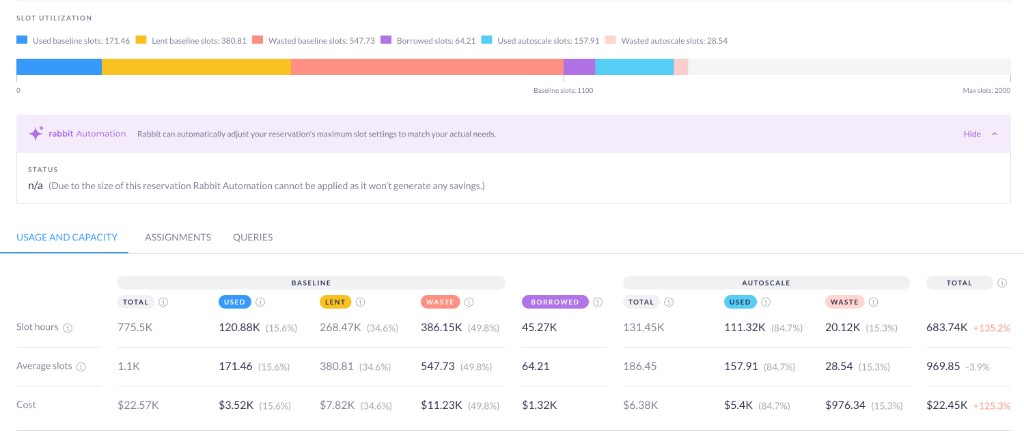
This granularity enables three approaches to reducing the effective slot-hour cost:
1. Right-size commitments and baselines. The effective baseline rate is driven by the ratio of committed capacity to total baselines. Over-committing means paying for slots you’ll never use; under-committing means excess baseline slots billed at the full PAYG rate. Finding the right balance — across capacity commitments, spend-based CUDs, and baseline allocations — requires analyzing actual usage patterns over time. Rabbit’s Reservation Planner helps here by simulating different commitment and baseline configurations against your historical usage to find the optimal setup.
2. Reduce autoscale waste. Autoscale waste is often the largest and most actionable contributor to the gap between list price and effective cost. Rabbit’s Max Slot Optimizer dynamically adjusts reservation capacity limits every second based on observed usage patterns, significantly reducing the waste left behind by BigQuery’s native autoscaler. Daangn, for example, was unaware of the scale of their autoscale waste until Rabbit made it visible: the native autoscaler’s ramp-down lag and 50-slot scaling increments had created a hidden tax across their reservations. With Rabbit’s automation, they achieved 41% recurring monthly savings on BigQuery compute. (See How to Optimize Your BigQuery Reservation Cost for a detailed walkthrough of the approach.)
3. Route cost-inefficient jobs to on-demand. Some jobs are cheaper on on-demand pricing than on a reservation — especially when the effective slot-hour cost is high. Because the effective rate is known per hour, Rabbit can simulate whether each job would have been cheaper on on-demand at the time it ran, considering the actual capacity state: how much baseline was free, how much autoscale would have been needed. Jobs that consistently cost less on on-demand can be rerouted automatically. (See The Power of Dynamic, Job-Level Pricing Optimization for how this works in practice.)
Together, these reduce the effective slot-hour cost from multiple angles: lowering waste, optimizing commitment structure, and routing work to the cheapest pricing model.
What does effective slot-hour cost mean for BigQuery cost attribution?
The question — what did that pipeline actually cost? — has an answer now. It’s not the commitment rate and not the list price. It’s the effective slot-hour cost multiplied by the slot hours consumed, where the effective rate already captures the waste and pricing structure of the reservation it ran on. That number matters for every team sharing a reservation: it’s what makes cost attribution real, chargeback defensible, and optimization decisions grounded in what you’re actually paying.
For practical strategies on reducing BigQuery compute costs, see How to Optimize Your BigQuery Reservation Cost.