
BigQuery Slot Waste: Why Teams Overpay for Capacity They Never Use
Kristóf Horváth
9 min read

This post explains BigQuery slot waste: why teams on capacity-based pricing still overpay for reservation capacity they rarely use, how to recognize the common patterns, and which technical guides to read next. It is written for engineering leaders, FinOps stakeholders, and platform owners who already run reservations and need a clear mental model before anyone opens a config console.
Moving to capacity-based pricing often feels like the optimization milestone. The invoice no longer spikes with every messy SELECT *. Slot commitments show a discount. Dashboards look calmer. And yet baseline capacity can sit idle most of the day, max slots can stay set for a peak that happens twice a week, and a commitment signed after a migration can lock in a floor that no longer matches demand. The bill looks intentional. The utilization story does not.
That gap is slot waste. Nordstrom hit a version of it after a warehouse migration: slot waste rose with the new footprint before rightsizing brought spend down materially (read our post-migration case study). The rest of this post is about recognizing the pattern early, without turning every leader into a reservation specialist.
What is BigQuery slot waste?
In BigQuery Editions, a reservation gives you dedicated compute capacity measured in slots. You typically control a baseline (slots always allocated and billed) and a max slots ceiling for autoscaling above that floor. Capacity-based pricing bills by slot-hour of capacity, not by bytes scanned, so idle allocated capacity still costs money.
Slot waste means you are paying for capacity you do not need for the workload you actually run. Two related ideas get mixed up with it:
- Under-provisioning is the opposite failure mode: too little capacity, queues, and latency. Fixing under-provisioning by permanently lifting baseline to peak is how many waste problems start.
- Idle slots are unused baseline capacity that other reservations in the same administration project can borrow. Idle sharing can reduce effective waste when capacity moves to work that needs it. It can also hide mis-sizing when utilization looks fine while the wrong pools absorb free capacity.
So waste is not “any slot that is momentarily unused.” Waste is a structural mismatch between what you pay for and what steady demand requires. For the broader map of what moves the BigQuery bill (not only reservations), see the leader’s guide to cost drivers:
Learn more:
What Actually Drives BigQuery Costs? A Leader's Guide
Why do teams overprovision BigQuery slots?
The most common pattern is simple: baseline gets set to peak, not to the floor of typical demand.
Peak-hour sizing feels responsible. Nobody wants the Monday morning dashboard refresh to queue behind a backfill. So the team screenshots the busiest window, sets baseline near that level, and treats the reservation as “solved.” Outside those busy hours, and often for most of nights and weekends, you still pay for that peak capacity. The reservation is doing exactly what it was configured to do. The configuration was sized for the wrong question.
A useful leadership reframe: baseline should cover the capacity you expect to use most of the time, not the capacity you needed once during a month-end crunch. Autoscaling and, when appropriate, on-demand routing exist for genuine bursts. When baseline absorbs the burst by design, you convert temporary demand into a permanent floor cost.
Learn more:
How to Configure BigQuery Baseline Slots and Slot Commitments
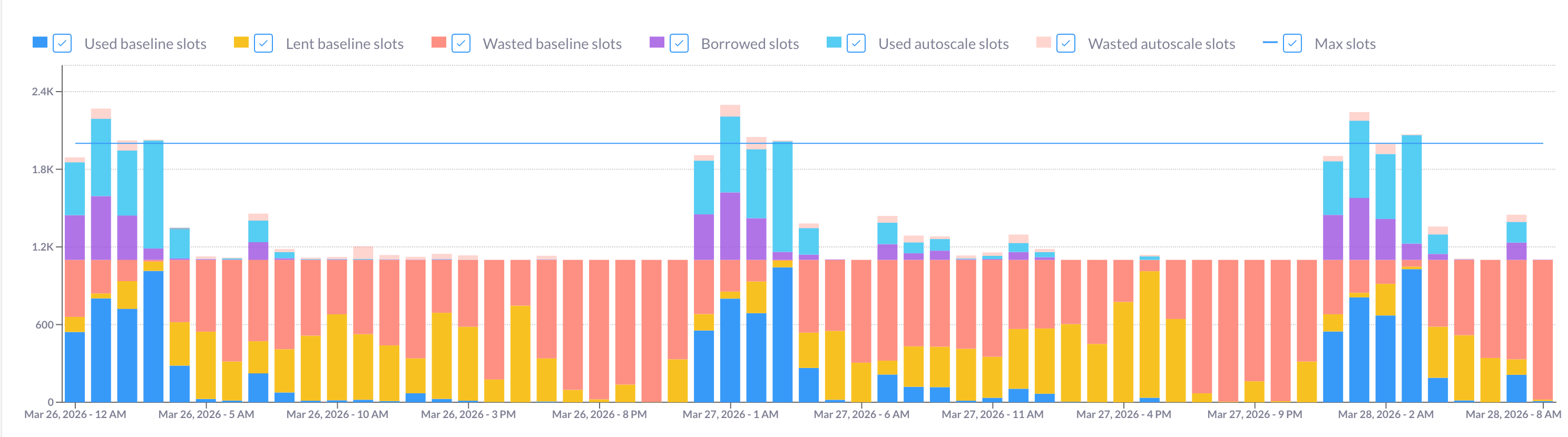
How does BigQuery autoscaling create waste even with a commitment?
Autoscaling is useful. It is also easy to misread as “we only pay when we need extra capacity,” which is only partly true.
Max slots is a cost ceiling the autoscaler will use, not a rare emergency brake. BigQuery scales in 50-slot increments and bills for scaled capacity, not for a precise count of slots a given job “should” have needed. Give the reservation a high ceiling because a peak screenshot looked scary, and bursty, short-running work will often consume that headroom to finish faster. You get latency wins. You also get a habit of provisioning more capacity than the shape of the workload justifies.
A slot commitment does not fix this by itself. Commitments discount baseline capacity for a term. They do not cover autoscaled slots above that baseline. Teams sometimes assume “we’re committed, so reservation spend is optimized”. In practice, discounted baseline plus an oversized max can still produce material BigQuery autoscaler waste on top of the commitment.
If you’re wondering how autoscaling behaves day to day, start here:
Learn more:
BigQuery Reservations: How Does Autoscaling Really Work?
If the question is how teams cut autoscale spend on an existing commitment without treating max slots as unlimited headroom:
Learn more:
How to Cut BigQuery Autoscaling Costs When You Have a Commitment
Pattern: commitments locked before demand is stable
The third waste pattern is timing. Commitments pay off when the committed floor matches genuine steady-state usage. They create discounted waste when you lock a peak-era baseline into a one-year or three-year term before the platform settles.
Common triggers: a warehouse migration, a seasonal spike, a new product launch, or the first months after moving from on-demand to reservations. Slot demand is noisy. A commitment signed against that noise becomes a hard floor: you keep paying for capacity even after pipelines stabilize lower, schedules shift, or teams move work between reservations.
Rightsizing before you renew or expand a commitment is usually cheaper than explaining a year of locked-in idle capacity to finance. For the practical rightsizing path:
Learn more:
How to Optimize BigQuery Reservations and Right-Size Commitments
What is the difference between idle slots and wasted slots?
Idle slot sharing is a real efficiency feature: unused baseline in one reservation can serve demand in another within the same admin project and region. When that works as intended, “idle” baseline is not pure waste. Another workload is getting free capacity you already paid for.
The waste appears when fairness assumptions do not match business intent. Classic example: a large non-prod reservation with many projects absorbs a disproportionate share of idle capacity under project-weighted defaults, while a lean production reservation looks underfed. Utilization charts can look healthy overall while critical jobs still compete for capacity, and the org responds by raising baseline again.
Google’s default for how idle capacity is distributed changed for new admin projects in April 2026 (reservation-based fairness), and scaling modes give more explicit control over whether a reservation can borrow, autoscale, or both. The leadership takeaway is not a config checklist. It is this: high aggregate utilization does not prove you are free of reservation waste. Ask whether idle flows match which workloads are supposed to get spare capacity.
Learn more:
BigQuery Idle Slot Sharing: What the April 2026 Default Change Means
BigQuery Reservation Scaling Modes
How can leaders spot waste without becoming slot experts?
You do not need to live in reservation charts to decide whether BigQuery reservation waste is likely. Ask the platform team these questions in a regular FinOps or capacity review:
- Is baseline closer to typical load or to peak? If the answer is peak, you are probably paying for idle capacity most hours of the week.
- What fraction of reservation spend is baseline versus autoscaled? A commitment-heavy bill with a large autoscaled share is a signal that max slots and burst behavior need a second look, not only baseline.
- When was the current commitment sized relative to today’s workload shape? If the answer is “during the migration” or “before the last major pipeline change,” put rightsizing on the agenda before renewal.
- Do multi-reservation idle flows match intent? Especially production versus non-production: is spare capacity landing where leadership expects?
If two or more answers are fuzzy, you have a slot-utilization story to investigate before you open another commitment or raise max slots again. Measuring utilization in depth is a separate technical topic; treat BigQuery slot utilization as a follow-on, not the first leadership conversation.
On the maturity curve, teams that can spot these patterns sit in the Optimized stage and are ready to keep gains from drifting. Continuous correction is the Automated stage:
Learn more:
From Reactive to Strategic: The BigQuery Maturity Journey
What to read next (and how Rabbit approaches slot waste)
If you only take one thing from this post: capacity-based pricing does not automatically mean rightsized capacity. Slot waste usually comes from peak-era baseline, oversized max slots on top of a commitment, commitments locked too early, or idle-sharing assumptions that hide mis-sizing. The fix path is technical, and it already lives in Rabbit’s guides:
- Baseline slots and commitments
- How autoscaling really works
- Cutting autoscaling costs on a commitment
- Rightsizing reservations and commitments
Doing that work by hand means repeating usage analysis every time pipelines, seasonality, or org structure shift. Rabbit approaches the same problem as continuous observation across jobs, labels, and reservations, with recommendations first and automation when you opt in. The Reservation Planner recommends baseline and max settings from actual usage history, with projected savings typically in the 20-50% range. Optional controls such as Max Slot Optimizer can tighten autoscaler ceilings after you enable them.
Use the BigQuery Savings Calculator for a rough estimate of recoverable waste in your environment, or dig into how Nordstrom reduced post-migration slot waste in the case study.