The Carbon Footprint of Your BigQuery Workloads: How to Measure and Reduce It
Kristóf Horváth
13 min read
This post explains how to find your BigQuery carbon footprint with the report Google Cloud already provides, what that report can and cannot tell you, and which efficiency changes can reduce the resource use associated with it.
BigQuery is serverless, but running queries, storing data, and supporting both with cooling and networking still consume electricity. Google’s sustainability guidance puts it plainly: every workload consumes energy and contributes to carbon emissions. Google Cloud’s Carbon Footprint report estimates those emissions for your billing account. The dashboard needs no setup and costs nothing to use; exporting its data to BigQuery incurs normal storage and query charges. The result is useful for sustainability reporting and trend analysis, but it is an allocated estimate, not a direct meter on individual BigQuery workloads.
What does Google Cloud’s Carbon Footprint report show for BigQuery?
Google’s Carbon Footprint dashboard estimates the greenhouse gas emissions associated with your use of covered Google Cloud services, per billing account. As of Google’s August 2026 list, the covered services include BigQuery, BigQuery BI Engine, the Data Transfer Service, the Reservation API and the Storage API. These appear as separate services, so your BigQuery footprint can be spread over several lines.
What you get:
- Two accounting views. Location-based emissions use the actual electricity mix of the grid where the workload runs, and ignore Google’s clean-energy purchases. Market-based emissions include the effect of those purchases. Both views cover all three scopes defined by the Greenhouse Gas Protocol (GHGP): Scope 1 (direct emissions, such as fuel burned for backup power and coolant leaks at data centers), Scope 2 (emissions from the electricity the data centers consume, which is where the two views differ) and Scope 3 (other indirect emissions, such as manufacturing the data center equipment). The methodology lists what each scope includes.
- Breakdowns by month, region, project and product. The dashboard shows monthly totals and a regional breakdown in both views. The project and product charts are found in the location-based view.
- Latency. Data for last month can take up to 21 days to become available.
- Low barrier to access. Anyone with the Carbon Footprint Viewer role on the billing account can open it, and that role does not require access to spend data.
What you do not get is anything below project level. There is no breakdown per query, job, dataset or reservation (see the export schema), and the figures are monthly. Google allocates emissions to customers through product SKUs and regional usage, so the report is an allocation, not a meter on your workloads. Google does say you can bring the allocated figures into your own emissions reporting as Scope 3.
What the report cannot prove: A change in the reported number does not provide query-level evidence that a specific optimization caused an equivalent physical emissions reduction. Google allocates service emissions through SKU and usage data, and pricing or metering changes can affect that allocation even when the underlying work stays the same. Use the report for accounting and trends, then use workload metrics to explain what changed.
Does lower cost always mean lower emissions?
Google’s guidance says cost optimization reduces energy use and emissions when it reduces resource usage. The same guidance adds a caveat: cost is only an initial indicator. The same spend can carry different emissions depending on region and energy mix, while a billing or pricing change can lower the bill without changing the work.
Cost is useful for finding wasted work and capacity. It is not a measurement of emissions. Cost is not a substitute for emissions accounting.
The report has its own limits:
- It is an estimate. Emissions are allocated by usage, and the customer-specific data has not been third-party verified or assured (though a third party has reviewed Google’s methodology for calculating and allocating GHG emissions).
- Figures can be restated. Google updates the carbon model periodically and may adjust current and earlier data. The export includes a
carbon_model_versioncolumn, and Google’s release notes tell customers when to run a backfill to correct earlier months. - It is slow and monthly. A change you ship in October shows up weeks later in monthly data, so compare several months.
Reporting requirements vary by organization and jurisdiction. Treat Google’s allocated figures as one input and confirm their use with whoever owns your sustainability reporting.
How does BigQuery efficiency connect to emissions?
Google’s sustainability guidance connects lower resource use with lower energy consumption and emissions. In BigQuery terms, the levers you control include how much data a workload reads and writes, how much computation it repeats, and how much reservation capacity you configure. Google does not expose the emissions effect of any one change at query level.
The chain looks like this: the work your queries do, the compute capacity that performs it, the electricity that capacity draws, and the emissions from generating that electricity. You control the first link. Google’s report estimates the last one.
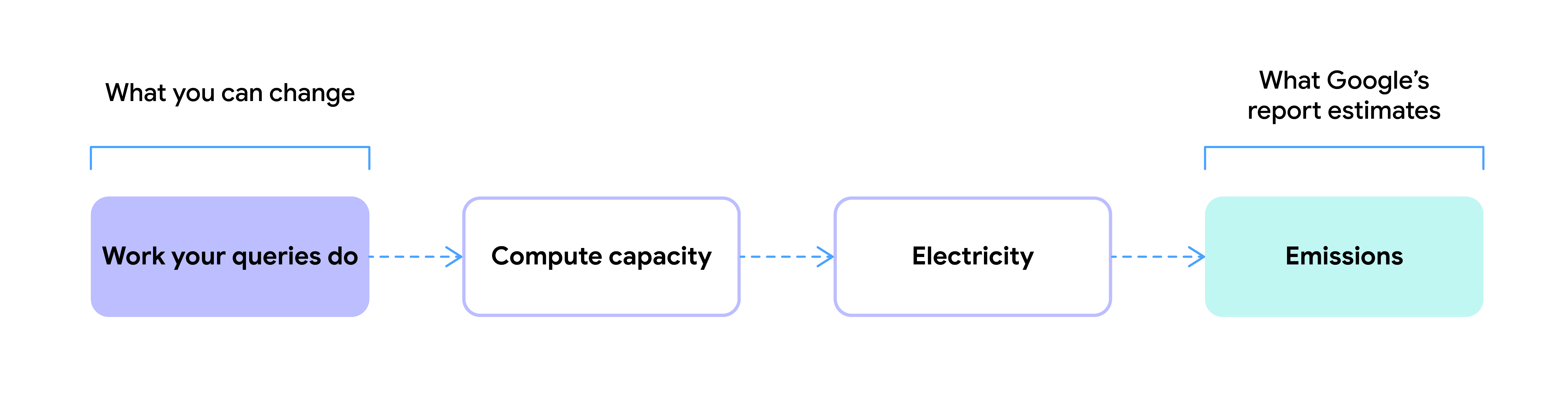
Here is how common BigQuery changes map onto that chain, and what the documentation does and does not support:
| Change | What it reduces | What the documentation supports |
|---|---|---|
| Select only the columns you need; filter on partition and cluster columns | Bytes read per query | BigQuery documentation says partitioning and pruning reduce the bytes a query reads and improve performance. Less data processed and less compute should in theory reduce emissions (this relationship is inferred, not measured per query). |
| Process data incrementally instead of reloading everything | Data processed per run | Same logic as pruning: less data read and written on each run. Google does not publish an emissions figure for it. |
| Use materialized views where results are reused enough to justify them | Repeated computation | BigQuery precomputes the results and, where possible, reads only changes from the base tables. Materialized views also require storage and maintenance, so the net resource benefit depends on query reuse and refresh patterns. |
| Expire or aggregate data you no longer need | Data stored | Google’s sustainability guidance recommends deleting or tiering infrequently accessed data to cut the energy cost of storage. In BigQuery, table and partition expiration control what you keep. |
| Rightsize reservation baseline and max slots | Capacity you pay for | Google’s general guidance says dynamic scaling prevents energy waste from idle or over-provisioned infrastructure. BigQuery bills for slots scaled rather than slots used, and baseline slots bill whether queries use them or not. Google does not document how changing one customer’s baseline or max translates into physical energy or emissions. |
| Change how you pay: logical vs physical storage billing, on-demand vs capacity pricing, slot commitments, committed use discounts | No underlying resource use by itself | These can change the price without changing the work. For example, changing the storage billing model only changes the metering configuration; the data stays in the same compressed physical format. Google does not document whether a pricing-only change can alter the Carbon Footprint allocation through its SKU-based methodology, so do not assume the reported figure will remain unchanged. |
One more point about idle capacity. Inside Google’s own accounting, idle machines are a real energy cost: the methodology allocates idle power to internal services in proportion to the resources they hold, whether or not those resources are used. That describes how Google attributes its own services, not how it bills you or how a reduction on your side registers in the report, so treat it as context rather than proof that trimming a baseline removes a measurable amount.
Learn more:
BigQuery Partitioning: How It Works, When to Use It, and What It Costs
Does your BigQuery region affect emissions?
Yes. The same query runs on a different electricity grid depending on where the data lives. Google publishes two numbers per region:
- Google CFE%: the average share of carbon-free energy consumed in that location on an hourly basis, including Google’s own clean-energy investments there.
- Grid carbon intensity (gCO2eq/kWh): the average operational emissions of the local grid. Google suggests using it to compare regions by the carbon intensity of their grid electricity.
Here are the regions BigQuery’s US and EU multi-regions are stored in, plus a few others for contrast:
| Region | Used by BigQuery multi-region | Google CFE% | Grid intensity (gCO2eq/kWh) | Low CO2 |
|---|---|---|---|---|
| us-central1 | US | 88% | 432 | Yes |
| us-west1 | US | 83% | 98 | Yes |
| us-central2 | US | 84% | 417 | Yes |
| europe-west1 | EU | 79% | 126 | Yes |
| europe-west4 | EU | 82% | 194 | Yes |
| europe-west3 | – | 70% | 276 | No |
| europe-north1 | – | 98% | 30 | Yes |
| northamerica-northeast1 | – | 97% | 11 | Yes |
| us-east1 | – | 31% | 579 | No |
| asia-southeast1 | – | 5% | 366 | No |
Google’s 2025 data as published on the Carbon free energy for Google Cloud regions page. Google last updated the page on 2026-10-13; values accessed on 2026-10-14. Check the page for current figures.
Three things stand out:
-
If you use the US or EU multi-region, your data is already in a Low CO2 region. BigQuery stores and processes multi-region data in a single region within the multi-region: one of
us-central1,us-west1orus-central2for US, andeurope-west1oreurope-west4for EU. BigQuery picks the exact one automatically. All five carry Google’s Low CO2 label, which requires a CFE% of at least 75% (or, where CFE data is unavailable, a grid intensity of at most 200 gCO2eq/kWh). -
The two columns can disagree.
us-central1has a high CFE% (88%) but a grid intensity of 432 gCO2eq/kWh, whileeurope-north1combines 98% with 30. CFE% includes Google’s clean-energy investments in the region, while grid intensity describes the local grid: for regions with a similar CFE%, Google says it indicates the relative emissions for the hours when your workload is not running on carbon-free energy. When you evaluate a region, Google’s guidance is to consider both location-based and market-based emissions. -
Moving data has a price. Google’s own region guidance lists latency, price and carbon as separate considerations, and notes that service prices differ by region. For BigQuery, add data residency requirements. A query that references a dataset runs in that dataset’s location, and reservations are tied to a location too: a job only uses a reservation in its own location, and without one there it runs on-demand. So after a move, jobs on that data run on-demand unless you have a reservation in the new location. A one-time cross-region dataset copy is billed as cross-region network traffic, and ongoing replication bills storage in the second region plus transfer.
So the practical step is to check where your datasets are before planning anything. The Low CO2 label is a threshold, not a ranking: qualifying regions can still differ substantially in CFE% and grid intensity. If region choice is open to you, compare both measures, then weigh any potential improvement against residency, latency, service pricing and transfer costs.
How do you measure your BigQuery carbon footprint?
You can do all of this with what Google provides, provided you have access to the billing account:
- Open the dashboard. In the Google Cloud console, go to Carbon Footprint and select your billing account. Start with the location-based view for the project and product charts.
- Export it to BigQuery. On the Carbon Footprint page, click Data export, choose a project, and create the export. This creates a BigQuery Data Transfer Service config from the “Google Cloud Carbon Footprint Exports” source, with a dataset you choose. You need Project Owner or Editor on the export project and Carbon Footprint Viewer or Billing Account Viewer on the billing account. The export writes a monthly partitioned
carbon_footprinttable on the 15th of the following month, and you can run a backfill from the transfer’s details page to load history back to January 2021. If you use VPC Service Controls, you need an ingress rule for the BigQuery API and the BigQuery Data Transfer Service API. - Query it. This sample from Google’s export documentation returns every row with selected dimensions and the location-based Scope 2 and total fields. It does not select the market-based fields:
SELECT
  usage_month,
  billing_account_id,
  project.number AS project_number,
  project.id AS project_id,
  service.id AS service_id,
  service.description AS service_description,
  location.location AS location,
  location.region AS region,
  carbon_model_version,
  carbon_footprint_kgCO2e.scope1 AS carbon_footprint_scope1,
  carbon_footprint_kgCO2e.scope2.location_based AS carbon_footprint_scope2_location_based,
  carbon_footprint_kgCO2e.scope3 AS carbon_footprint_scope3,
  carbon_footprint_total_kgCO2e.location_based AS carbon_footprint_total_location_based
FROM
  `PROJECT.DATASET.carbon_footprint`
ORDER BY
  usage_month DESC,
carbon_footprint_total_location_based DESC- Put cost next to it. Google recommends joining the carbon export with your Cloud Billing data. Look at where both are high and where they diverge.
How do you reduce your BigQuery carbon footprint?
Once you’ve exported your Carbon Footprint data:
- Find the hotspots. Because the data is aggregated at project level, your project and folder structure determines how useful the breakdown is. Identify the projects, products and regions that dominate.
- Start with changes that reduce work. Use the table above to prioritize less data read and written, less repeated computation, and less unnecessary storage. Treat reservation rightsizing as an indirect lever, and do not count pricing-only changes as resource reductions.
- Evaluate location separately. Check your dataset locations against the region table, then account for residency, latency, service pricing and transfer costs before considering a move.
- Record changes and compare several months. Google suggests annotating carbon data with events such as rightsizing a resource. Check
carbon_model_versionbefore attributing a change in the reported figure to your optimization.
How can Rabbit help you run a leaner BigQuery estate?
The practical goal is a leaner BigQuery estate: less unnecessary work, storage and paid capacity. Those resource reductions are consistent with Google’s sustainability guidance, and result in a BigQuery estate that is faster and cheaper to run. (Note that the Carbon Footprint report cannot attribute an emissions reduction to a specific Rabbit recommendation or automation.)
Query patterns and table layout, reservations, pricing models and storage all affect each other, and workloads keep changing. Rabbit treats BigQuery as one interconnected system. It provides recommendations for query and table optimization, storage billing and reservation sizing, with opt-in automation for supported levers such as max slot optimization.
If you would like to see where your BigQuery estate has efficiency to recover, book a demo and we will walk through your own usage data. For a first estimate on your own, try the BigQuery Savings Calculator.