
BigQuery Reservation Groups: How Idle Slots Flow Between Related Reservations
Balázs Varga, Kristóf Horváth
10 min read

This post explains BigQuery reservation groups: what they change about idle slot sharing, how Google describes the two-step distribution of idle capacity, prerequisites (including reservation-based fairness), documented limitations, and how to create and manage groups. It is written for teams that already run capacity-based BigQuery in an administration project and want a finer-grained preference than “every reservation competes evenly for idle slots.”
Unsure if you should switch to capacity-based reservations? Read our guide:
BigQuery Pricing Models Explained: On-Demand vs Capacity-Based
Idle slots are the spare baseline capacity other reservations are not using. Under reservation-based fairness, BigQuery first shares idle slots across reservations (rather than skewing shares by project count). That is a big improvement when one reservation has many small projects and another has one large one.
Learn more:
BigQuery Idle Slot Sharing: What the April 2026 Default Change Means for Your Reservations
Reservation groups add another knob: reservations in the same group treat each other as preferred peers for idle capacity before that capacity is allocated to other reservations (or other groups) in the same scope. If you have two reservations that back one product line, or a pair of pools that should borrow from each other before a noisy neighbor reservation does, groups are the documented way to express that preference.

Preview status: As of late May 2026, per Google’s documentation, reservation groups are a Preview feature, subject to Pre-GA terms, with limited support. Behavior and limits can change; treat operational details as something to confirm against current docs before rollout.
What problem do BigQuery reservation groups solve?
Without reservation groups, once fairness is on, idle slots are still shared under a flat competition model at the reservation level: each reservation is one peer among others in the administration project (subject to the fairness rules Google documents). That is fair in a mathematical sense, but it may not match how you want risk or capacity to cluster.
Reservation groups let you declare that certain reservations are more related than others: they should see each other’s eligible idle slots first, before idle capacity is divided among ungrouped reservations and other groups. Google’s analogy in the docs is loose but helpful: groups organize reservations a bit like datasets organize tables: a grouping construct for management and policy, not a replacement for assignments (projects, folders, orgs still map jobs to reservations through assignments and optional runtime overrides).
Important mental model: groups do not route a query to “the group.” Jobs still run on a specific reservation according to your assignment hierarchy and any flexible assignment you use. Groups only affect how idle slots are prioritized among reservations.
Learn all about BigQuery Editions and Reservations. Download our white paper:
How does idle slot sharing work with reservation groups?
Reservation groups change the priority of allocating idle slots:idle capacity from a grouped reservation is offered to other members of the same group before it is available to reservations outside the group (in the same project).
Concrete example. Reservations 1 and 2 are in one group; 3 is not. 1 has 1,000 idle slots (baseline it is not using). 2 and 3 both have jobs that want more slots. 2 can draw on 1’s idle first. 3 does not get an equal turn at 1’s surplus just because fairness is enabled: 3 only borrows idle that is still available after in-group demand is satisfied (and subject to the rest of Google’s fairness and per-reservation settings, such as scaling mode and ignore_idle_slots).
Google also documents a second layer: how the overall idle pool is split when many reservations compete:
- Among top-level units: Idle slots are distributed evenly across (a) each reservation that is not in a group and (b) each reservation group as a single unit.
- Inside a group: That group’s share is distributed evenly across its member reservations.
Let’s see another example. In this pool split: three reservations and 1,200 idle slots in the pool (coming from a reservation outside of any group). With no groups, each reservation gets 400. If 1 and 2 are grouped and 3 is not, tier one gives 600 to the group and 600 to 3. Tier two gives 300 each to 1 and 2.
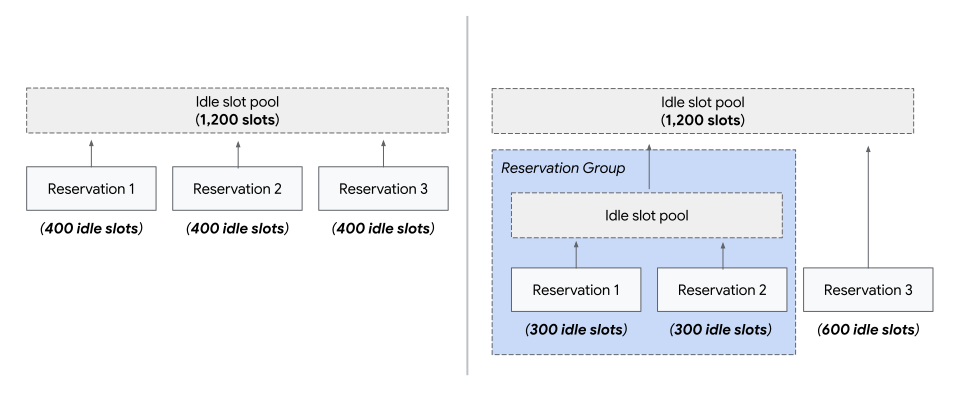
In summary, groups change two things: who gets first access to a reservation’s idle slots, and how leftover idle slot pool is divided across grouped and ungrouped reservations.
What do you have to enable before using reservation groups?
You must turn on reservation-based fairness on the administration project before reservation groups are available.
If you are still on project-based fairness, start with the fairness model itself: groups sit on top of that layer. Our post about project-based fairness walks through why fairness exists and how Google’s defaults changed on 1 Apr 2026.
What are the documented limitations of BigQuery reservation groups?
The following are constraints called out in Google’s documentation for reservation groups:
- Reservations in the same group must live in the same administration project and same region (or multi-region bucket that counts as that location — align with your admin project’s location model).
- Reservation-based fairness must be enabled.
- The total size of reservations in one group cannot exceed 30,000 slots, including autoscale limits.
- All reservations in a group must use the same edition.
- You cannot mix reservations with and without managed disaster recovery (MDR) in one group: either all have MDR or none do. If MDR is enabled, all must use the same primary and secondary region pair.
When are reservation groups a good fit, and when are they a distraction?
Reasonable fits for BigQuery reservation groups:
- Two or more reservations back one critical product or one pipeline family, and you want idle headroom to stay within that family before it is offered symmetrically to unrelated reservations.
- You split capacity for governance (separate reservations per team) but want two teams’ pools to prefer each other’s spare baseline before a third, heavier consumer joins the idle lottery.
- In a large organization, when each team has multiple reservations to manage their workloads. You’d like to assign Team A 5000 slots (to distribute among their reservations as they see fit), Team B 3000 slots, Team C 2000 slots. Before reservation groups, if you wanted to ensure that the different teams don’t affect each others’ capacities, you would have had to put their reservations in separate administration projects, or limit idle slot sharing, thus wasting slots when one of the teams weren’t using all of their capacity. Now, you can ensure that the 5000 slots of Team A get prioritized among their own reservations, lending spare capacity to other teams only when Team A doesn’t use it.
Poor fits for reservation groups:
- Trying to fix chronic under-provisioning or bad SQL with grouping. Groups rebalance idle sharing; they do not create baseline you did not buy, and they do not shrink bytes processed.
- Expecting cross-admin-project or cross-region sharing. Reservations and commitments are regional and admin-project scoped; groups add tighter locality rules, not broader ones.
How do you create and manage a BigQuery reservation group?
See Google’s official docs for console, bq, Terraform, and lifecycle notes. A quick summary:
Console. In BigQuery, open ‘Capacity management’, select reservations (the option to create reservation groups will only be visible once reservations are selected), use ‘Create reservation group’, name the group, and add members. The table can show groups expanded to list member reservations. ‘Ungroup’ removes a group when appropriate (including after you remove members — see below).
bq. Create an empty group with bq mk --reservation_group, update a reservation’s membership with bq update ... --reservation_group_name=..., list with bq ls --reservation, clear membership with an empty --reservation_group_name="", and remove an empty group with bq rm --reservation_group. Naming rules: lowercase letters, numbers, dashes; start with a letter; do not end with a dash; max 64 characters.
Terraform. The google_bigquery_reservation_group resource sets name and location for the group; reservations reference the group through their reservation_group field when your module wires them.
API. The REST surface includes projects.locations.reservationGroups for teams that prefer direct API or internal tooling over bq/Terraform.
Cleanup quirk. Google notes that when the last reservation leaves a group, the group resource may still exist until you delete the empty group manually. Do not assume ungrouping the last reservation deletes the group for you.
IAM. To set reservation_group on reservations, Google points to Reservation Editor (roles/bigquery.reservationEditor) on the reservation resource (or equivalent permissions via custom roles).
How do BigQuery reservation groups interact with other controls?
Per-reservation scaling and ignore_idle_slots. Groups change who gets which idle slots first; they do not replace per-reservation settings for baseline, autoscale caps, predictable max slots, or whether a reservation ignores idle slots. If two reservations in a group have different borrowing behavior, the group still only affects distribution of idle capacity they are eligible to receive under those flags.
Flexible assignment / runtime reservation selection. Choosing a reservation at job time is orthogonal: the job still runs on one reservation; the group does not act as a runtime selector.
Multiple administration projects. Idle capacity is not shared across administration projects today; reservation groups do not bridge that boundary.
What should you monitor after you change reservation grouping?
Treat a group change like any reservation topology change:
- Watch slot utilization timelines and job queueing for member reservations and for reservations that used to receive more idle borrow from them.
- Compare before/after for the same calendar window (weekday mix, pipeline schedules) so you are not confusing grouping with a seasonal dip in load.
Google’s docs do not promise a specific steady-state split in production beyond the illustrative arithmetic; real pools depend on how many reservations are idle, which jobs run where, and edition-specific behavior. Plan a staged rollout (group two non-critical reservations first, observe, then expand).
Where does Rabbit fit in?
You can implement reservation groups entirely in Google Cloud console, bq, Terraform, or the API, no third-party product is required. The hard part is rarely the click path; it is knowing whether grouping matches your fairness posture, which reservations belong together under the documented limits, and whether your baseline, commitments, and autoscale caps still make sense after idle borrowing patterns shift.
We built Rabbit for teams that want BigQuery cost and capacity treated as one system: reservation and slot signals alongside query patterns, pricing model choices, and other levers so changes in one place do not silently create waste in another. If you are grouping reservations to reflect real workload coupling, Rabbit’s role is to help you see slot and effective cost impact across jobs and reservations, and to keep reservation-related decisions aligned with the rest of your optimization story. Book a demo of Rabbit to see what it could do for your team.
Want more background on how reservations consume baseline, idle, and autoscale capacity before you touch groups?
BigQuery Reservation Autoscaling: How Does it Really Work?
BigQuery Reservation Scaling Modes: What They Are and How to Choose the Right One