
Webinar Recap: How to Automate BigQuery Cost & Performance at Scale
Rabbit
7 min read
On 26 March 2026 we ran a live webinar titled Automating BigQuery Cost & Performance at Scale, hosted by Rabbit’s VP of Customer Success Stewart Bryson. Our goal with the session was practical: we noticed that many teams still experience BigQuery billing as a black box. They are unclear about cost allocation, and unclear which controls actually move spend. The webinar walked from pricing fundamentals to four concrete automation levers most organizations underuse, then showed how Rabbit packages those same optimization patterns.
This post distills the narrative from the session, giving you practice-oriented guidance on how to optimize your BigQuery spend. It is a recap, not a comprehensive review of the webinar – for the full story and actionable tips, watch the recording on-demand:
Watch the webinar recording:
Automating BigQuery Cost & Performance at Scale
Why BigQuery compute pricing is hard to reason about
In the webinar, we framed compute pricing as a stack of choices rather than a single dial:
- On-demand pricing is tied to bytes processed (the familiar per-TiB model).
- Capacity-based pricing is tied to slots and a slot-hour rate, which varies by edition (Standard, Enterprise, Enterprise Plus).
- Commitments (1 or 3-year) layer discounts on top of capacity-based use—but they also change how you should think about utilization and waste.
A recurring theme we see with our clients: teams often standardize on one pricing model per project (for example, they move whole projects onto reservations to capture commitment discounts for that project). That is a big win when it works, but it can still leave money on the table when individual jobs would be cheaper on the other model, or when idle committed capacity is not actually consumed.
Learn all about BigQuery Editions and Reservations. Download our white paper:
A customer-shaped example: why “reservations only” is not the end state
In the session, Stewart used a real Rabbit customer example (numbers as shown in the webinar) to illustrate the gap between “we moved to reservations” and “we optimized how jobs are priced”:
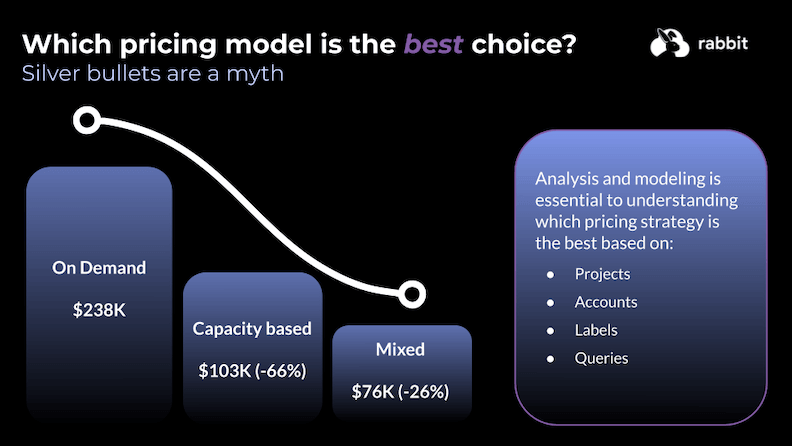
- The company in our example spent roughly $238k/month on on-demand compute.
- After moving workloads to capacity-based reservations, spend dropped substantially to $103k/month (-66%).
- The comparison goes further: adopting a mixed strategy (routing work to the cheaper model per job, not only per project) led to savings of about a further 26% ($76k/month spend in the scenario presented).
This example highlights that analysis and modeling across projects, accounts, labels, and queries matter as much as the initial reservation choice. Naturally, you shouldn’t treat those figures as universal benchmarks – but they show why granularity beats one-size-fits-all project defaults when you operate at scale.
The webinar moves on to the four key levers teams can pull to optimize BigQuery spend.
Lever 1: Job-level pricing (matching each query to the right model)
Jobs can carry their own pricing configuration, so you are not limited to “everything in this project is on-demand” or “everything is on capacity.” The problem in practice, however, is that millions of queries, shifting data sizes, and contention make manual assignment non-scalable.
The proposed engineering pattern:
- Prepare the query.
- Use jobs /
INFORMATION_SCHEMAhistory to aggregate per logical query (not only per job id) using bytes scanned and slots used—both are available regardless of which pricing model ran the job. - Combine historical signals with a real-time check of reservation slot usage (idle capacity vs full queues that would trigger autoscale or queuing).
- Choose the model: if idle slots can run the work on capacity, use them; if the reservation is saturated such that the job would queue or autoscale aggressively, on-demand pricing may be cheaper for that execution.
- Submit the job to BigQuery with the chosen job configuration.
That’s what Rabbit exposes through integrations (for example dbt and Airflow), versus every team building APIs/SDKs and orchestration glue themselves.
Lever 2: Autoscaler waste (why “max slots” is the real control)
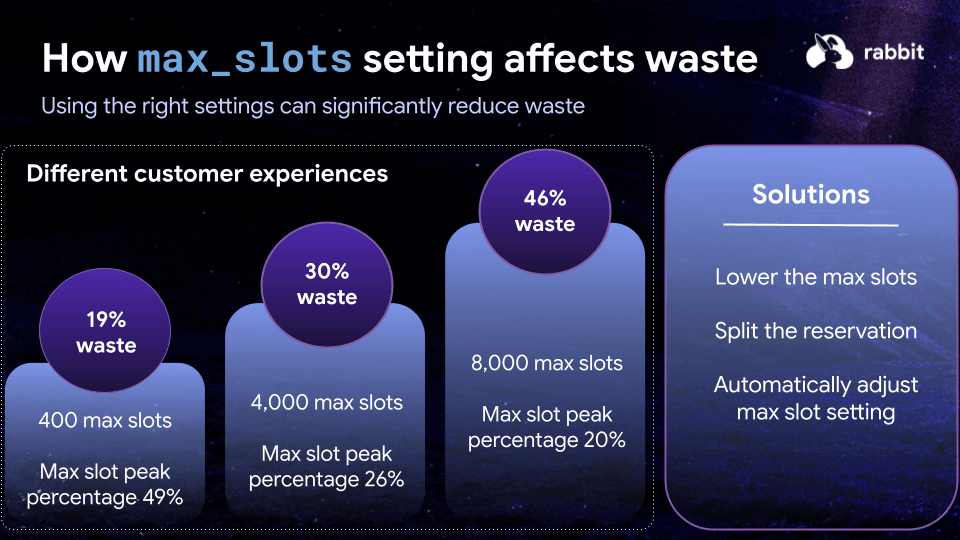
BigQuery’s autoscaler is convenient but blunt: it increments in coarse steps (50 slots), scales up quickly, but scales down slowly, and bills in minimum 60-second windows–together, these create persistent overhead.
In the session, we listed pragmatic mitigations teams use:
- Lower
max_slots(trades waste vs risk of queuing). - Split reservations (sometimes helpful, sometimes not—increment size matters more for small pools).
- Automatically adjust
max_slotsover time.
Because max_slots can be updated via API immediately, teams often schedule increases for peaks and decreases for nights/weekends, or wrap critical pipelines so they raise max_slots before heavy BigQuery stages and lower them after. The “aha” in the session: the same job-level pricing abstraction (checking live slot pressure) can be composed with max_slots orchestration so you are not only capping the autoscaler, you are also avoiding routing everything to on-demand when idle slots exist.
In the session, we illustrated waste percentages at different max_slots settings and workload shapes. We recorded average customer savings in the 20–40% range for Rabbit’s BigQuery automation.
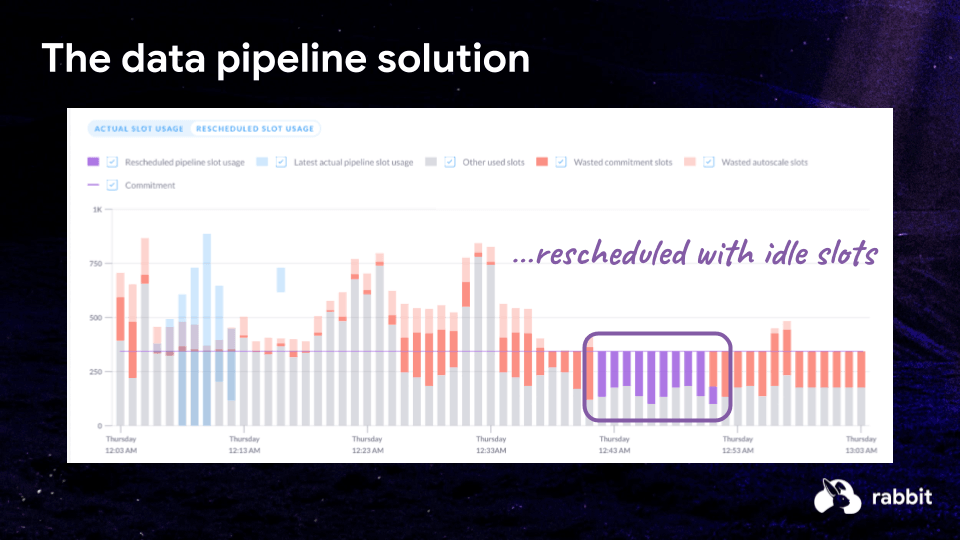
Lever 3: Pipeline rescheduling (flatten contention without rewriting SQL)
Even with the right pricing defaults, many pipelines start at the same clock boundary (for example “top of the hour” in a scheduler). That synchronization can spike slot demand, wake the autoscaler, and burn money even when downstream SLAs would allow a short wait.
The remedy: treat rescheduling as an optimization problem. Queue or defer lower-priority work by minutes, not necessarily tens of minutes, to spread demand into windows where idle slots exist. In the session, we extended the same flow as job-level pricing with an extra step: evaluate SLAs and queue eligible work accordingly.
Lever 4: Agentic recommendations (GitOps-friendly savings)
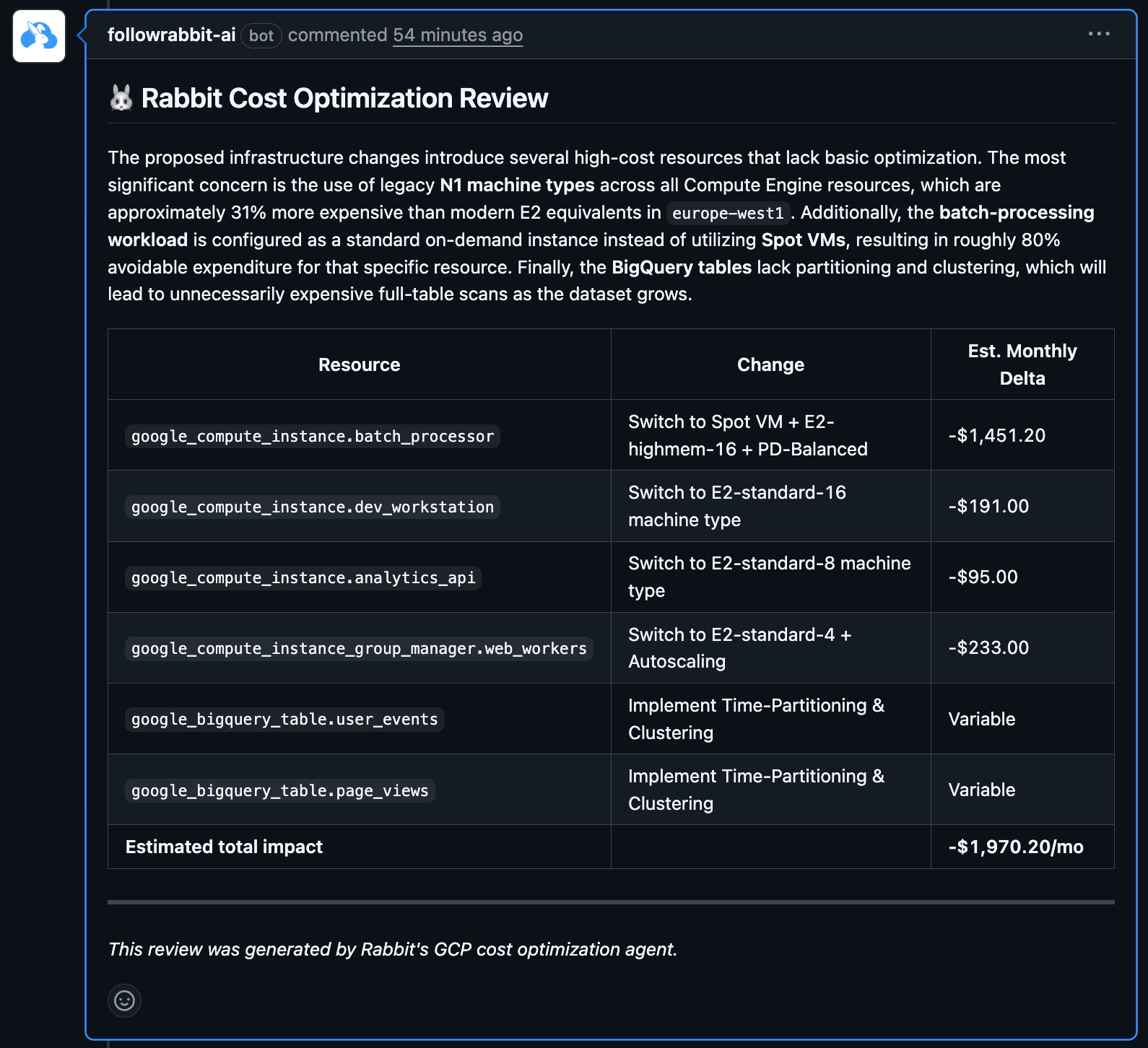
The final lever introduces a new Rabbit feature, connecting LLM-assisted development to deterministic cost logic. Generic coding agents are strong on broad best practices, but BigQuery economics depends on your specific environment: your history, your reservations and your utilization.
The way Rabbit sees it: if cost rules live behind a deterministic API (the same signals used for job-level routing and waste), an agent’s job is narrower: find the right SQL, DDL, Terraform, or Python to change, and open a pull request with an explainable savings angle.
The session showed an example automated PR adjusting storage billing choices for tables: small per-change dollars that compound if every merge incrementally removes waste. Related recommendation types include partitioning, clustering, and materialized views where patterns justify them.
How does Rabbit help: demo highlights
The session ends with a live walkthrough focused on reservations with Rabbit Automation enabled, including:
- Visibility into autoscaler waste and baseline waste
- Slot borrowing/lending and time-series drill-down from daily to minute-level behavior.
max_slotstracking against Rabbit’s automated adjustments to reduce autoscaler-driven overhead compared to static caps.
Missed the live session? Watch the recording on-demand, and try Rabbit free of charge to see what BigQuery savings your team could unlock.
Watch the webinar recording:
Automating BigQuery Cost & Performance at Scale